> For the complete documentation index, see [llms.txt](https://docs.realmacsoftware.com/elements-docs/llms.txt). Markdown versions of documentation pages are available by appending `.md` to page URLs; this page is available as [Markdown](https://docs.realmacsoftware.com/elements-docs/developers/store/join-the-partner-program.md).
# Join the Partner Program
Build and share products on the RapidWeaver Elements Platform.
The partner program is curated and managed on a case by case basis. Not everyone can join. We carefully **hand pick partners** to ensure the **highest standards of quality**, reliability, and **long term support** for RapidWeaver Elements customers.
If you’re considering building products for Elements then, welcome! This documentation is for you. It covers everything you need to know about submitting product to the growing number of passionate RapidWeaver Element users around the world.
Elements and the Elements API allows you to build unique products that can be used by the rapidly growing Elements user base.
[Learn more about joining our Store Partner Program](/elements-docs/developers/store/join-the-partner-program.md).
#### Supported Products
Your Product for Elements can contain a single add-on type, or bundle together different types, including any combination of the following:
* [Components](https://docs.realmacsoftware.com/elements-docs/elements-language/component/components) – Reusable, structured elements
* [Resources](https://docs.realmacsoftware.com/elements-docs/elements-language/resource/what-are-resources) – Assets like, icons, images, video, audio, or other files
* [Templates](https://docs.realmacsoftware.com/elements-docs/elements-language/template/what-are-templates) – Pre-built sections consisting of multiple components
* [Themes](https://docs.realmacsoftware.com/elements-docs/elements-language/theme/what-are-themes) – Predefined visual styles
* [Projects](https://docs.realmacsoftware.com/elements-docs/elements-language/project/what-are-projects) – Pre-built projects
* eBooks — Coming soon
### Monetising Products for Elements
Monetising your addon means you can accept payments from users when they download your work. More importantly, it gives you options.
Charging creates a clear value exchange. It also helps cover your time, ongoing support, and future updates. Users tend to take paid addons more seriously, and that usually results in better feedback.
You can still run discounts, giveaways, or set the price to zero whenever you want, but starting with monetisation in place keeps you in control. It turns your addon into an asset rather than a hobby project, and it gives you room to grow if it becomes popular.
#### How it works
Sign-up for an Elements Cloud account (in-app), enter your details, along with connecting your Stripe account. We take care of the rest. You can be up and running and selling products within an afternoon.
You can set your own prices, launch new products or updates, and most importantly get your product directly in front of users via the Elements Store [available on the Web](https://store.elementsapp.io/), and built directly into Elements.
You don't need to get bogged down in setting up a website, online payments system, distribution, updates, or licensing, the Elements Store Platform handles all of it.
**There are no enrolment fees or subscription costs to publish your product in the Elements Store.**
#### Supported Monetisation
The Elements Store supports four types of payment options for your product(s):
* Free
* Lifetime Pricing (purchase once, own forever)
* Monthly Subscription Pricing
**A note on subscription pricing:** From the customer’s point of view, it works as you’d expect. While their subscription is active, they have full access to the contents of the pack inside Elements, whether that’s components, projects, or other resources.
If they cancel, access continues until the end of the current billing period. After that, the pack is no longer available in their library.
#### Offering Discounts
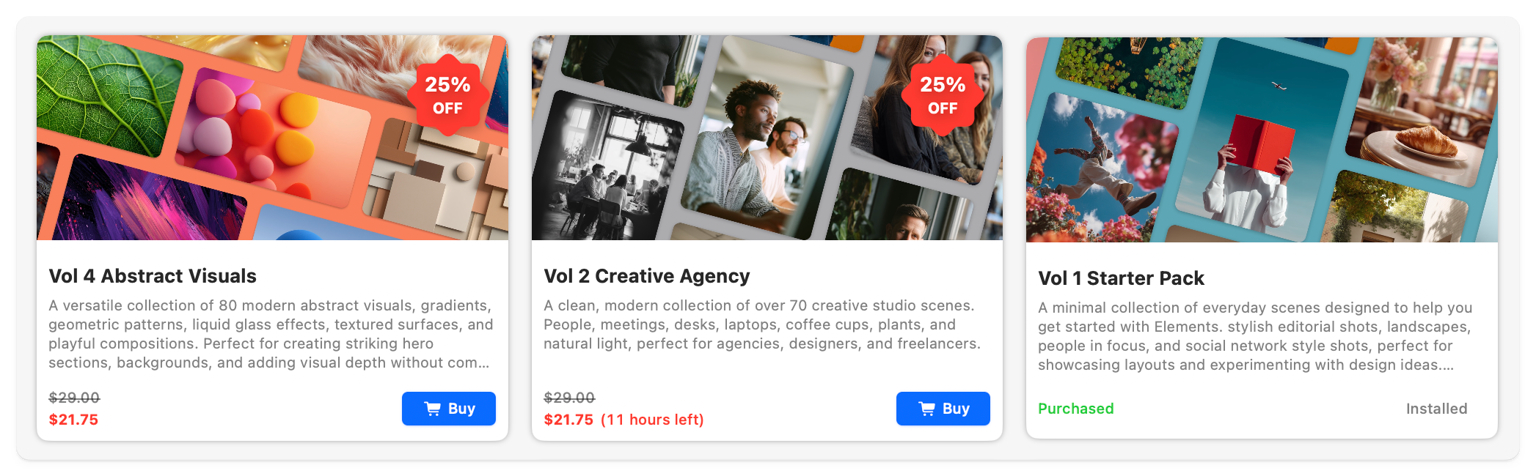
You can set a discount on your add-ons for a fixed period. The Storefront will show the discounted price along with the remaining time when it drops under 7 days. Time is displayed in days, then switches to hours once it falls below 24 hours, and under 1 hour it will show the minutes and seconds remaining.
If a user has already purchased the product, no pricing or discount will be displayed for them.
All timing is based on UTC on the server, not the user’s local timezone.
#### Partner Platform Fees
As a partner, you make commission on all sales via the Elements Store Platform. The money is payed out to your Stripe Connect account. A percentage of each sales goes to cover transaction fees, hosting, distribution, and helps support the development of the Elements platform.
Each payment is split between you and the Elements Platform 70/30. For example: with a $10 payment, $3 is paid to Elements Platform and $7 is paid to you. Elements Platform pays the transaction fee.
**Each sale is split 70/30 between you and the Elements Platform.**\
If your product is $10, you receive $7 and the platform receives $3. We also cover all Stripe transaction fees.
**Where required, VAT or sales tax is added on top of your product price.**\
We collect and remit this tax, and it isn’t part of the 70/30 split.
**There are no enrolment fees or subscription costs to publish your product in the Elements Store.**
#### Partner Payout Timings
Sales made through the Elements Store will appear in your Stripe Connect dashboard right away. The funds usually take 2 to 5 business days to clear before they become available for deposit into your bank account.
#### Earnings Statements
**Disclaimer:** This article is neither legal advice nor tax advice. Please speak to your own accountant if you have questions about payouts or reporting requirements.
When you sell products through the Elements Store, Elements Platform Ltd is the merchant of record. All customer transactions are handled by us directly. Your financial relationship is with us, not the end customer. We handle all customer payments, tax collection, and VAT obligations.
Payouts to creators are treated as a separate B2B transaction. Each payout represents income earned by the creator for supplying a digital product to the Elements Platform.
At the start of each month, we’ll generate a monthly earnings statement covering the previous period. This will be available to download in your dashboard, and we’ll also email it to you automatically. You’ll also be able to access historical statements at any time.
This statement will include your total earnings and acts as the record for your accounting.
From your side, you can treat this as income from Elements Platform Ltd. In most cases, for developers, this will fall under the reverse charge mechanism, but we’d recommend confirming with your accountant based on your specific situation.
So in short, you won’t need to invoice us, we’ll handle the reporting and payouts on our side.
#### Sales Tax on the Elements Platform
**Disclaimer:** This article is neither legal advice nor tax advice. We recommend that you speak to your tax advisor with any questions or concerns about tax reporting.
Element Platform acts as the Merchant of Record for all sales on the Store. This means we automatically handle all sales tax collection and remittance worldwide. You don't need to manage any tax settings or applications, we take care of everything.
#### EU & UK VAT on the Elements Platform
**Disclaimer:** This article is neither legal advice nor tax advice. We recommend that you speak to your tax advisor with any questions or concerns about vat reporting.
The Elements Store handles VAT on behalf of creators for all digital product sales in the EU and the UK. We collect, remit VAT without sellers having to lift a finger.
No forms to fill out, no submissions required.
For all sales to EU and UK buyers, Elements Platform Ltd acts as the 'merchant of record' for the sale, making the Elements Store responsible for collecting and remitting VAT.
---
# Agent Instructions
This documentation is published with GitBook. GitBook is the documentation platform designed so that both humans and AI agents can read, navigate, and reason over technical content effectively. Learn more at gitbook.com.
## Querying This Documentation
If you need additional information that is not directly available in this page, you can query the documentation by asking a question.
Perform an HTTP GET request on the following URL with the `ask` and `goal` query parameters:
```
GET https://docs.realmacsoftware.com/elements-docs/developers/store/join-the-partner-program.md?ask=&goal=
```
`ask` is the immediate question: it should be specific, self-contained, and written in natural language.
`goal` is what the user is ultimately trying to achieve, the reason they need the answer. Sharing it helps GitBook give you a better, more relevant answer. A goal is most helpful when it describes the outcome the user wants rather than restating the question. For example, with `ask=how do I create an API token`, a goal like `automate deployments from our CI pipeline` lets GitBook tailor the answer to that use case.
The response will contain a direct answer to the question and relevant excerpts and sources from the documentation.
Use this mechanism when the answer is not explicitly present in the current page, you need clarification or additional context, or you want to retrieve related documentation sections.